
Overview of Team Grid – Team Member Showcase WordPress Plugin & Team Editor
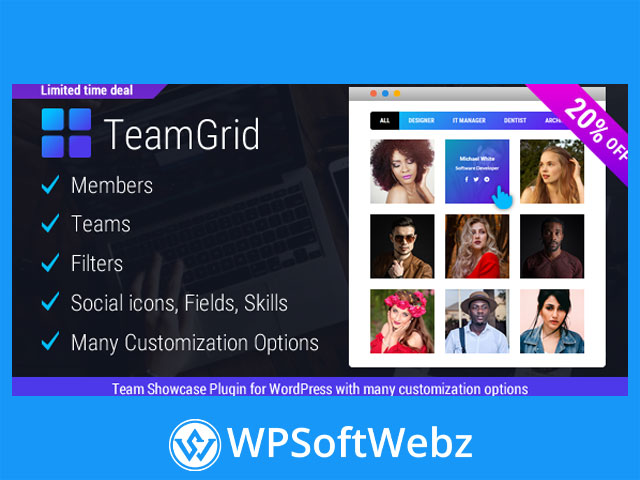
The Team Grid – Team Member Showcase WordPress Plugin & Team Editor is a premium WordPress team showcase solution that lets you create modern, responsive “meet the team” sections and staff directories without touching code. Built specifically for WordPress site owners, agencies, and brands that need flexible team layouts, this team member showcase plugin combines a powerful team editor with a visual, filterable grid display optimized for any device.
Designed as a highly customizable team grid plugin, it allows you to manage unlimited team members and multiple separate teams, each with its own layout, styling, and display settings. Whether you’re building a simple team page or a complex staff directory with filters, skills, and detailed profiles, Team Grid gives you the tools to present your people professionally and consistently.
Key features of Team Grid – Team Member Showcase WordPress Plugin & Team Editor
Rich, structured team member profiles
Team Grid focuses on turning each person on your team into a well-presented, structured profile:
- Member name, photo, job title and short description
- Full bio/content area for longer introductions or detailed backgrounds
- Custom member fields such as email, phone, address, department, or location
- Visual skills with labels and levels, ideal for showcasing expertise or competencies
- Social icons for popular networks (for example Facebook, Twitter, LinkedIn and others)
This makes the plugin ideal not only for a simple team member showcase, but also for more advanced use cases like experts, instructors, authors, or company leadership profiles.
Flexible layouts, design templates and filters
The plugin offers a large collection of predefined layouts and design templates that you can mix and match to create many ready-made styles:
- Multiple grid layouts for different card shapes and proportions
- Different image formats (square, vertical, horizontal) for perfect cropping
- Design templates that control card framing, typography and hover effects
- A robust filtering system with many predefined filter styles
- Fully customizable filters, so visitors can quickly sort team members by role, department, location, or any taxonomy you configure
Instead of manually styling each team section, you choose a layout and template, tweak the options, and get a polished team grid that fits your brand.
Multiple profile viewer modes
To control how visitors see full member details, Team Grid – Team Member Showcase WordPress Plugin & Team Editor includes several viewer options:
- Popup overlay viewer for quick, focused reading without leaving the page
- Inline expansion that reveals more details directly inside the grid
- Slide-in panels from the left or right for a more app-like experience
- Dedicated member permalinks that act as individual profile pages
You can choose the viewer style on a per-team basis, making it easy to adapt the plugin to different sections of your site.
Live preview and visual customization
Team Grid comes with a live preview inside the WordPress admin, so you can see your changes instantly while you design:
- Adjust colors, borders, backgrounds and typography
- Fine-tune spacing and card appearance
- Preview how filters, hover effects and viewers behave
- Experiment safely before publishing your “our team” page
This visual workflow makes the plugin approachable for non-technical users while still offering the depth designers and developers expect from a premium WordPress team plugin.
Shortcodes, Elementor compatibility and flexible embedding
The plugin is built to integrate cleanly with your existing page-building workflow:
- Team shortcode to insert a complete team grid in any page or post
- Member shortcodes for inserting individual member images, content, fields, skills or social icons
- Works with popular page builders such as Elementor and Elementor Pro
- Optional custom CSS classes to fine-tune styling via your theme or child theme
This gives you full freedom to place team grids in landing pages, about pages, sidebars, footer sections, or any custom layout built with your favourite page builder.
How the team editor workflow works
With the integrated team editor, managing your team showcase becomes a streamlined process:
- Create members
- Add a new member from the Team Grid menu.
- Fill in basic info (name, role, image, short description, full content).
- Attach filters (e.g. department, office, team) for later use in front-end filtering.
- Add social icons, custom fields and skills as needed.
- Define filters, fields and skills centrally
- Create filter categories once and reuse them across members.
- Define field labels (e.g. “Phone”, “Office”, “Department”) so they’re consistent.
- Set up skills you want to display, then assign levels per member.
- Build your teams
- Create one or more teams and pick which members to include.
- Choose the layout, viewer type and available filters.
- Style the team grid using the visual options and live preview until it matches your brand.
- Copy the shortcode and place it anywhere on your site.
This separation between members, filters and teams lets you manage small or large organizations without losing control over structure and consistency.
Common use cases for this WordPress team grid plugin
Team Grid – Team Member Showcase WordPress Plugin & Team Editor is suitable for a wide range of sites, including:
- Digital agencies and studios wanting a portfolio-style “meet the team” page
- SaaS companies or startups highlighting founders, leadership and key staff
- Corporations that need a clean staff directory or department-based team listing
- Educational institutions showcasing teachers, coaches, mentors or speakers
- Online magazines and blogs presenting authors and editorial teams
- Non-profits or NGOs displaying board members, volunteers and regional teams
- Membership sites, communities or networks listing experts and contributors
Wherever people are an important part of your brand story, this team member showcase plugin helps you present them clearly and professionally.
Benefits for branding, UX and content strategy
Using a dedicated team grid plugin instead of manually building team sections offers several advantages:
- Stronger brand presentation – consistent images, typography and card styles strengthen your visual identity.
- Better user experience – filters and clear layout help visitors quickly find the person or department they need.
- Richer storytelling – full bios, skills and custom fields allow you to tell the story behind your team.
- Content reusability – member shortcodes let you reuse profiles in different sections without duplication.
- Scalability – as your organization grows, you can add members and teams without redesigning your layouts.
Who is Team Grid – Team Member Showcase WordPress Plugin & Team Editor for?
This premium WordPress team showcase plugin is ideal if you:
- Want more control than a basic theme “team” section can offer
- Need multiple team pages or departments with different styles
- Prefer a visual, live-preview workflow instead of hand-coding layouts
- Care about responsive, mobile-ready presentation out of the box
- Value a structured team editor for long-term content maintenance
If you’re looking for a powerful yet easy-to-use way to present the people behind your brand, Team Grid – Team Member Showcase WordPress Plugin & Team Editor gives you a flexible, professional team member showcase solution for WordPress. Use it to build engaging team grids, staff directories and “about us” pages that truly reflect the strengths of your organization.