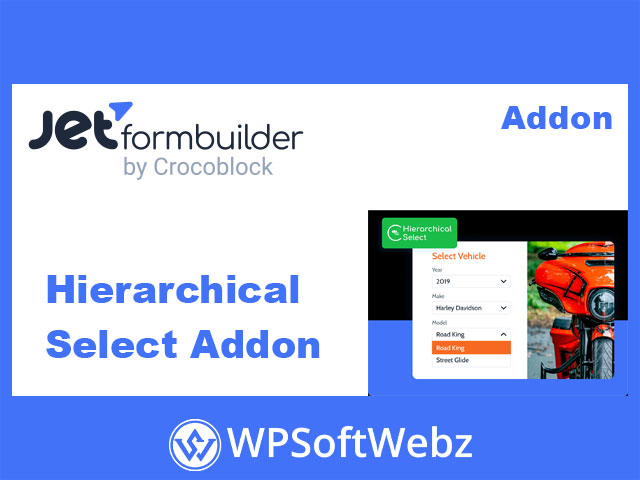

The JetFormBuilder Hierarchical Select Addon is a premium JetFormBuilder extension that lets you build cascading dropdown lists driven by hierarchical taxonomies in WordPress. It transforms complex multi-level choices—like categories, product attributes, locations, or job roles—into a clean, step-by-step selection experience for your users.
JetFormBuilder Hierarchical Select Addon overview
This addon adds a dedicated Hierarchical Select field/block to JetFormBuilder forms. Instead of a single long Select field, you can split choices into multiple levels, where each level’s options depend on the parent selection.
It pulls terms from any hierarchical taxonomy (such as categories or custom taxonomies) and outputs them as a multi-level select structure. This is especially useful in post submission and post editing forms where users need to assign structured taxonomies quickly and accurately.
Because it’s built for JetFormBuilder, the Hierarchical Select field works smoothly with the existing form builder interface, Gutenberg blocks, presets, and post-submit actions.
Key features of the hierarchical select field
- Multi-level, cascading dropdowns for hierarchical taxonomies
- Works with any WordPress theme and JetFormBuilder forms
- Uses existing taxonomy terms as options (categories or custom hierarchical taxonomies)
- Pulls term values by ID, Name, Slug, or Meta
- Controls for how and when child levels become visible or enabled
- Supports adding new terms via the form (manual input) where allowed
- Integrates with post-submit actions to insert or update post terms
- Can feed term meta values into JetFormBuilder’s Calculated Field
- Developer hooks to adjust which taxonomies and terms are loaded
Real-world use cases
Car submission & classified ads
Create car or classified listing forms where users select:
- Brand
- Model line
- Specific model or variant
The Hierarchical Select Addon lets you structure this as intuitive cascading dropdowns so authors don’t have to scroll through hundreds of mixed options.
Product catalogs & multi-level categories
For online catalogs or content directories, you can use hierarchical dropdowns such as:
- Men → Collection → Jeans
- Category → Subcategory → Item type
This helps keep data consistent and ensures products or posts are always mapped to the correct taxonomy branch.
Job and vacancy application forms
Use the addon in job application forms to let applicants choose:
- Company or department
- Job role or position
- Vacancy type or location
This ensures HR teams receive standardized taxonomy data that can be filtered and queried later.
Hierarchical taxonomy-based dropdowns
The core of the JetFormBuilder Hierarchical Select Addon is its taxonomy integration:
- Hierarchical taxonomy output
Only hierarchical taxonomies can be used as a data source, ensuring that parent–child relationships are preserved in the dropdown levels. - Flexible term value source
Choose whether the stored value should be the term ID, name, slug, or a value from term meta. This gives you full control over how data is saved and used later in your workflows, filters, and calculations.
Advanced control over child levels
Controlling how deeper levels behave is crucial for usability. The add-on provides several strategies for handling child levels:
- Always show all levels at once
- Hide deeper levels until a valid parent option is selected
- Show all levels, but keep deeper levels disabled until the parent selection is made
This allows you to tune the UI to your audience—keeping forms minimal and guided, or fully expanded for power users.
Adding new terms from the front end
For certain workflows, you may not want to pre-create every possible term. The addon supports manual input on higher levels:
- Allow users (or editors) to create new terms directly via the form
- The text input temporarily appears where no child terms exist
- Once saved, the new term becomes part of the taxonomy and appears as an option in the relevant level
This is ideal for user-driven directories, community submissions, or content teams that frequently introduce new structured categories.
Field settings and configuration
The Hierarchical Select field block includes familiar JetFormBuilder controls:
- Field label & description for clear front-end UX
- Form field name (slug) for mapping and internal consistency
- Default value to preselect frequently used options
- Taxonomy type selector to choose the hierarchical taxonomy used as the source
- Term value from to define whether the form stores ID, name, slug, or meta-based values
An “Edit Levels” interface lets you define each level in detail:
- Level name (internal reference)
- Visible label for users
- Placeholder text for each dropdown
- Optional descriptive text to explain the level
- Button to add as many levels as your taxonomy requires
- Toggle to enable manual input where appropriate
Integration with post-submit actions and presets
Because the JetFormBuilder Hierarchical Select Addon is deeply integrated into the JetFormBuilder ecosystem, it works smoothly with:
- Insert/Update Post actions to save selected terms to posts
- Preset settings to pre-fill existing post terms when editing content via a form
- Field mapping so you can decide from which hierarchy levels the selected terms should be saved
When preset terms have children, the entire branch of the hierarchy can be displayed automatically, making front-end post editing fast and consistent.
Calculated fields and term meta
For advanced scenarios such as discounts, scoring, or pricing, you can use:
- Term meta values as a basis for calculations
- The option to get calculated values directly from term meta and feed them into JetFormBuilder’s Calculated Field
This enables powerful workflows like:
- Discount levels based on category selections
- Weighted scores based on hierarchical choices
- Dynamic pricing or totals derived from the selected taxonomy path
Developer-friendly customization
For developers, the addon exposes PHP hooks that allow you to:
- Adjust the list of taxonomies shown in the field
- Modify the parameters used to query terms
- Process and transform terms before they are rendered in the dropdowns
This makes the JetFormBuilder Hierarchical Select Addon suitable for highly customized projects where taxonomy structures and queries need fine-tuning.
Who is the JetFormBuilder Hierarchical Select Addon for?
The JetFormBuilder Hierarchical Select Addon is ideal for:
- Site owners building structured directories, listings, or catalogs
- Agencies that rely on JetFormBuilder Pro for advanced, front-end content management
- Developers who need taxonomy-driven forms with clean data structures
- Projects where multi-level selections (like locations, product attributes, or content types) must be simple for end users
If you’re already using JetFormBuilder and need elegant, multi-level dropdowns powered by hierarchical taxonomies, this addon is a powerful upgrade. Add the JetFormBuilder Hierarchical Select Addon to your stack to streamline complex selections, improve data consistency, and deliver a more polished form experience on your WordPress site.