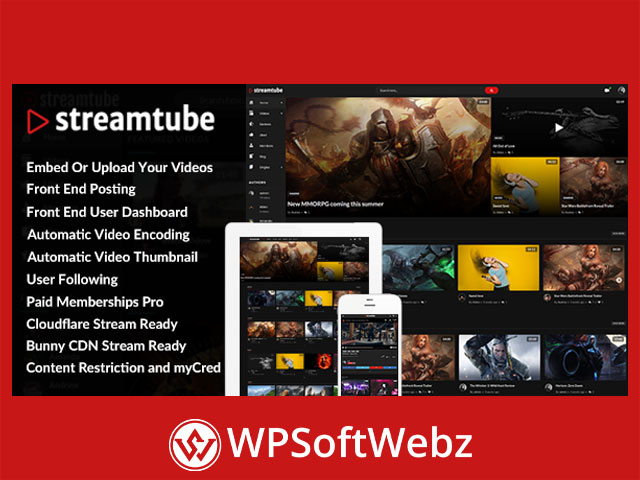

StreamTube – Video Streaming WordPress Theme is a premium, responsive solution for building video portals, creator communities, membership platforms, e-learning libraries, gaming channels, news websites, and multi-author video-sharing networks. It combines flexible video publishing tools with front-end user features, streaming service integrations, community functionality, content monetization options, and customizable layouts for creating a professional video-focused WordPress website.
StreamTube – Video Streaming WordPress Theme
StreamTube is designed for website owners who want more than a standard blog theme with embedded videos. It provides dedicated tools for uploading, processing, organizing, presenting, and monetizing video content through WordPress.
The theme can support several types of video projects, including:
- Video-sharing communities
- Vlogging websites
- Gaming and esports portals
- Online learning platforms
- News and entertainment channels
- Product review websites
- Membership-based video libraries
- Multi-author creator platforms
- Premium video content websites
- Video marketplaces
- Business training portals
Its responsive design helps video pages, user profiles, collections, navigation elements, and supporting content adapt across desktops, tablets, and mobile devices.
Flexible Video Publishing Options
StreamTube supports multiple methods for adding video content to WordPress. Administrators and authorized members can publish self-hosted videos or embed content from supported external platforms.
Self-Hosted Video Uploads
The theme allows users to upload their own video files. This is useful for creators, educators, businesses, and communities that want to manage original video content directly from their WordPress website.
Administrators can also control storage usage with quota management features. Upload limits can be applied to individual users or user roles, helping website owners manage server resources more effectively.
Additional storage capacity can also be incorporated into a monetization strategy for websites that allow members to upload content.
Embedded Video Support
StreamTube can display videos from services such as:
- YouTube
- Vimeo
- Dailymotion
- Websites supporting the WordPress oEmbed protocol
- Sources providing compatible iframe embed codes
This flexibility allows publishers to combine original uploads with externally hosted media without rebuilding their content workflow.
Automatic Video Encoding and HLS Streaming
StreamTube includes automatic video transcoding functionality that can convert uploaded video files into HLS format through FFmpeg when the required server software is available and correctly configured.
HLS streaming can divide video content into segments and support more efficient delivery across different devices and network conditions. This makes the theme suitable for website owners who want a more advanced self-hosted streaming workflow than a basic downloadable video file.
The video processing workflow can also support features such as:
- Automatic transcoding after upload
- Multiple playback quality options
- Automatic thumbnail generation
- Video watermarking
- Video encryption
- Automatic publishing after processing
- Notifications when processing succeeds or fails
- Chapters generated from timestamps in post content
Because video encoding can require significant server resources, website owners should choose hosting that matches their expected upload volume, file sizes, storage requirements, and audience traffic.
Cloud Video Streaming Integrations
StreamTube supports integration with external video delivery services, including Cloudflare Stream and Bunny Stream. These services can help website owners upload, process, secure, and deliver videos without handling every video operation on the main WordPress hosting server.
Cloudflare Stream Integration
The Cloudflare Stream API integration supports video synchronization and delivery workflows such as:
- Sending WordPress videos to Cloudflare Stream
- Importing synchronized videos into WordPress
- Direct and resumable uploads
- Automatic thumbnail generation
- Animated preview generation
- Background processing status detection
- Secure playback using signed URLs or tokens
- Live streaming
- Simulcasting to additional platforms
- REST API uploads
- Automatic publishing after processing
These capabilities can benefit video platforms that require scalable delivery, secure access, and streamlined processing.
Bunny Stream Integration
The Bunny Stream API integration provides another option for processing and delivering video content. Supported workflows include:
- Automatic video synchronization
- Direct and resumable uploads
- Thumbnail generation
- Animated preview images
- Token-based video protection
- Automatic content organization
- Bulk video importing
- Automatic publication after encoding
- REST API upload support
- Processing status notifications
External streaming services may require separate accounts, configurations, and service fees that are not included with the theme.
Integrated Video.js Player
StreamTube uses a Video.js-based player for presenting self-hosted and supported streaming content. The player provides useful controls for building a polished viewing experience within WordPress.
Available player capabilities include:
- Playback quality selection
- Multiple bitrate options
- VTT subtitle tracks
- Video watermarks
- Control-bar branding
- Keyboard shortcuts
- Social sharing tools
- Custom player skins
- Right-click blocking
- Support for compatible 360-degree video
These controls help website owners create a branded player experience while giving viewers practical playback and accessibility options.
Video Collections and Viewer Tools
StreamTube allows visitors and members to organize video content through collection-based features.
Users can work with:
- Custom video collections
- Playlists
- Watch Later lists
- Viewing history
- Automatically suggested next videos
- Upcoming video sections
These tools can encourage visitors to explore more content and return to videos they have saved. Collections are especially useful for tutorials, lesson series, episodic entertainment, product demonstrations, and curated topic libraries.
Front-End Video Submission
The theme provides front-end posting functionality, allowing approved users to submit content without accessing the main WordPress administration area.
Depending on the website configuration, users can manage:
- Uploaded videos
- Published posts
- Comments
- Profile information
- Avatars
- Profile photos
- Custom post types
- Custom taxonomies
- Custom metadata fields
This front-end workflow makes StreamTube Video Streaming WordPress Theme suitable for community-driven websites, creator networks, learning platforms, and multi-author publishing projects.
Administrators remain responsible for defining user permissions, reviewing submissions, moderating content, and securing file uploads.
Front-End User Dashboard
Members receive a front-end dashboard where they can manage their activity without entering the WordPress backend. This creates a more focused experience for contributors who only need access to their own content and account information.
The dashboard can provide access to areas such as:
- Video management
- Comment management
- Profile editing
- Account information
- Orders and downloads through compatible eCommerce configurations
- Analytics reports
- Stored collections
- Liked content
- Upload quotas
A front-end dashboard can make a video community feel more like a dedicated platform rather than a conventional WordPress website.
Community and Social Features
StreamTube includes interaction tools that can help transform a video catalog into an active user community.
User Profiles and Following
Members can create personalized profiles with avatars and profile photos. Users can also follow other members, making it easier to keep track of preferred creators and contributors.
Likes and AJAX Comments
The built-in like functionality allows viewers to engage with video posts and maintain a list of content they have liked.
AJAX-powered comments can load and submit without requiring a full page refresh. This allows visitors to participate in discussions while remaining on the video page.
BuddyPress Compatibility
BuddyPress compatibility can extend StreamTube with broader social networking functionality, including:
- Activity streams
- Private messages
- Notifications
- User groups
- Friend connections
- User mentions
- Community relationships
BuddyPress must be configured separately according to the needs of the website.
Forums and Private Messaging
Compatibility with bbPress allows website owners to add discussion forums. Better Messages integration can provide private real-time communication between members.
These community features are valuable for educational portals, creator groups, fan communities, professional networks, and membership websites.
Video Advertising and Monetization
StreamTube includes several options for generating revenue from a video platform.
VAST Video Advertising
The built-in video player supports VAST-compatible advertising. Website owners can configure ad placements such as:
- Pre-roll advertisements
- Mid-roll advertisements
- Post-roll advertisements
- Linear video ads
- Non-linear banner ads
- Multiple VAST tags
- Compatible VPAID advertising
- Google Ad Manager campaigns
- Google AdSense-supported configurations
- Other compatible VAST ad servers
Advertising availability and behavior depend on the chosen ad provider, campaign configuration, privacy requirements, and player setup.
Sell Video Content with WooCommerce
WooCommerce compatibility enables website owners to sell access to video content using supported WooCommerce payment gateways.
The user dashboard can also display WooCommerce-related account information, including:
- Orders
- Downloads
- Customer addresses
- Purchased content
This integration can be used for premium tutorials, training materials, independent productions, digital lessons, or exclusive entertainment content.
Membership-Based Content Access
Paid Memberships Pro compatibility allows publishers to create membership levels and restrict selected video content according to user access.
This makes StreamTube suitable for:
- Subscription video libraries
- Paid educational portals
- Member-only creator content
- Professional training websites
- Premium entertainment communities
- Private organizational video hubs
Points, Rewards, and Creator Earnings
myCred compatibility can add points and reward functionality to the platform. Depending on the configuration, members may earn or use points for activities such as watching videos, liking posts, purchasing access, receiving donations, or completing transactions.
Multi-Vendor Video Marketplace
Dokan compatibility can help transform the website into a multi-vendor marketplace where multiple creators or sellers offer video content through a shared platform.
Marketplace functionality requires careful configuration of commissions, vendor permissions, payment processing, content ownership, refunds, and moderation policies.
Video Privacy and Content Protection
StreamTube includes tools designed to provide greater control over video distribution.
Available protection features include:
- Signed playback URLs or tokens through supported streaming services
- Token authentication
- Video encryption
- URL hashing
- Domain-based embedding restrictions
- Video watermarking
- Right-click blocking
- User-role content restrictions
Embedding privacy controls can block unauthorized domains or allow playback only on approved websites. This can help reduce casual redistribution of proprietary video content.
No WordPress theme can guarantee complete protection against copying or screen recording, so these features should be treated as deterrents and access-control tools rather than absolute digital rights management.
Search, Discovery, and Content Browsing
Large video websites need effective tools for helping visitors find relevant content. StreamTube supports several browsing and discovery features, including:
- Search autocomplete
- Infinite content loading
- Video collections
- Related and upcoming content
- Viewing history
- Watch Later functionality
- Featured sliders
- Member directories
- Post locations
- Reviews with customizable criteria
These features can help visitors discover creators, topics, series, courses, reviews, and popular content more efficiently.
Elementor Page Building
StreamTube works with Elementor, allowing administrators and designers to create custom page layouts through a visual drag-and-drop interface.
Elementor can be used to arrange landing pages, promotional sections, category introductions, creator pages, and other supporting content around the theme’s video functionality.
This can benefit users who want to customize layouts without manually editing theme templates. The final design possibilities depend on the installed Elementor edition, compatible extensions, and website configuration.
Responsive Layout and Display Options
The theme includes full-width and boxed layout options, premade homepage designs, and multiple single-video presentation templates.
Its responsive structure is designed to adapt elements such as:
- Video players
- Navigation menus
- Content grids
- Sidebars
- User dashboards
- Profiles
- Comment sections
- Collections
- Advertising areas
StreamTube also includes dark and light display modes, allowing visitors or website owners to choose a presentation that suits the content and brand identity.
International and Multilingual Websites
StreamTube is translation-ready and supports right-to-left layouts. These capabilities make it suitable for international video websites and communities serving languages with different text directions.
Website owners can combine the theme with an appropriate translation workflow or multilingual plugin according to their localization requirements.
Analytics and Performance Reporting
Google Site Kit reporting can be made available through the front-end user dashboard. This allows supported analytics and search performance information to be presented to users without requiring direct access to the WordPress administration area.
Analytics can help creators and platform administrators understand:
- Audience activity
- Content engagement
- Traffic patterns
- Search visibility
- Popular video pages
- Viewer behavior
The availability and accuracy of reports depend on correct Google Site Kit, analytics, permissions, and API configuration.
Easier Website Setup and Customization
StreamTube includes a child theme and demo import functionality to help users establish the initial website structure.
The child theme provides a safer foundation for code-level customizations because modifications can be separated from the main parent theme files.
After importing a starting layout, website owners can customize:
- Branding
- Colors
- Typography
- Homepage sections
- Menus
- Video templates
- Sidebars
- Widgets
- User features
- Monetization settings
Imported content should be treated as a starting point and replaced with original text, images, videos, policies, and branding before launch.
Who Should Use StreamTube?
StreamTube is particularly suitable for:
- Video creators building an independent platform
- Businesses publishing product demonstrations
- Educators offering video lessons
- Gaming communities sharing streams and recordings
- News publishers prioritizing video coverage
- Agencies developing client video portals
- Membership businesses selling exclusive content
- Organizations creating internal training libraries
- Entrepreneurs building multi-vendor video marketplaces
- Communities allowing members to upload videos
The theme is best suited to projects that need user submissions, video organization, memberships, community interaction, streaming integrations, or monetization features beyond simple video embedding.
Conclusion
StreamTube – Video Streaming WordPress Theme provides a comprehensive foundation for creating responsive video portals, streaming libraries, creator communities, educational websites, and monetized content platforms. Its combination of self-hosted uploads, HLS encoding, cloud streaming integrations, front-end dashboards, user profiles, collections, advertising, memberships, eCommerce, and community tools supports both publisher-managed and user-generated video projects.
Choose StreamTube to build a professional WordPress video platform where creators can publish content, viewers can discover and organize videos, and website owners can develop sustainable membership, advertising, or marketplace strategies.