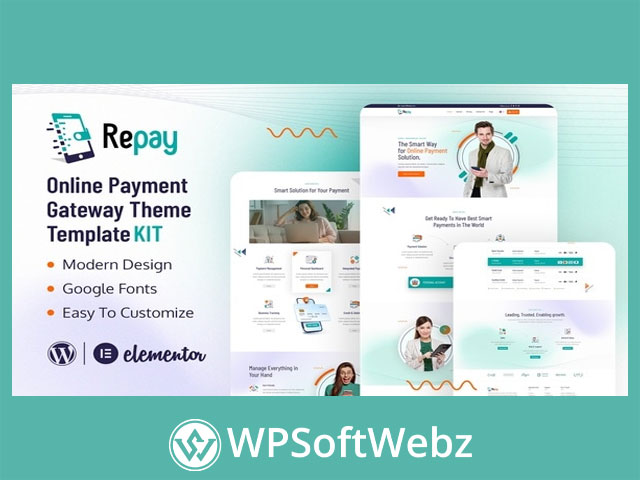

Repay | Payment Gateway Elementor Template Kit for Modern Payment Websites
Repay | Payment Gateway Elementor Template Kit is a premium Elementor template kit designed for online payment gateway, digital finance, money transfer, payment service, and transaction-focused business websites. It provides pre-designed page content for Elementor, helping businesses create a polished web presence for payment solutions, online financial services, and business growth without building layouts from scratch.
This template kit is intended for WordPress websites using Elementor. It is not a full WordPress theme; instead, Repay | Payment Gateway Elementor Template Kit contains ready-made Elementor page templates and design sections that can be imported, customized, and adapted to match your brand.
What Is Repay | Payment Gateway Elementor Template Kit?
Repay | Payment Gateway Elementor Template Kit is built for companies that want a clean, modern, and professional website design for payment-related services. It is suitable for businesses offering online payment solutions, money transfer services, fintech platforms, digital wallet services, payment processing, financial technology, and related business services.
The kit has been optimized for use with the free Hello Elementor theme, while also being suitable for most themes that support Elementor. This makes it a flexible choice for WordPress users who want a focused payment gateway website design powered by Elementor’s visual editing experience.
Key Features of Repay | Payment Gateway Elementor Template Kit
No-Code Elementor Customization
Repay | Payment Gateway Elementor Template Kit supports true no-code customization through Elementor’s drag-and-drop visual builder. This allows users to edit page layouts, text, images, sections, and design elements without writing code.
Centralized Style Editing
The kit allows fonts and colors to be customized in one place, while individual elements can also be fine-tuned when needed. This helps website owners maintain consistent branding across their payment gateway or fintech website.
Modern and Professional Design
The design style is clean, modern, and business-focused, making it suitable for companies that need to build trust around online transactions, payment services, and financial technology solutions.
Fast-Loading Layout Approach
Repay is described as fast-loading, which is important for professional service websites where users expect a smooth and efficient browsing experience.
Works With Most Elementor Themes
Although optimized for the Hello Elementor theme, Repay | Payment Gateway Elementor Template Kit may also be used with most WordPress themes that support Elementor. This gives site owners flexibility when choosing their broader WordPress setup.
Included Page and Section Templates
Repay | Payment Gateway Elementor Template Kit includes ready-made layouts for important website pages commonly needed by online payment, fintech, and financial service businesses. Verified template examples include:
- Home page
- About page
- Services page
- Pricing page
- FAQ page
- Team page
- Testimonial page
- Contact page
- Coming Soon page
These layouts help create a complete website structure for businesses presenting online payment solutions, money transfer services, or payment processing features.
Required Plugins
The official listing identifies the following plugins as required for the kit:
- Elementor
- ElementsKit Lite
- MetForm
These plugins support the imported templates, form layouts, and header or footer setup used within the kit.
Benefits for Payment Gateway and Fintech Websites
Repay | Payment Gateway Elementor Template Kit is useful for businesses that need a professional website design tailored to online payments and digital finance. Its ready-made structure helps reduce design time while still allowing full visual customization.
Key benefits include:
- Create a polished payment gateway website faster
- Customize layouts visually with Elementor
- Present services, pricing, FAQs, team details, and testimonials
- Build a professional online presence for fintech or payment services
- Maintain consistent colors, fonts, and branding
- Use modern landing pages for payment solution promotion
- Adapt templates for related financial service websites
Best Use Cases for Repay | Payment Gateway Elementor Template Kit
Online Payment Gateway Websites
The kit is well suited for companies that provide digital payment processing, online transaction management, or payment gateway services.
Fintech and Digital Finance Companies
Repay can be adapted for fintech startups, digital wallet platforms, money transfer services, and online financial technology businesses.
Business Service Landing Pages
The professional design also works for agencies or businesses promoting payment solutions, transaction platforms, or digital financial tools.
Service-Based Payment Solution Websites
With templates for services, pricing, FAQs, contact details, and testimonials, the kit supports websites that need to explain offerings clearly and encourage inquiries.
Important Notes
Repay | Payment Gateway Elementor Template Kit is a template kit for Elementor page builder, not a standalone WordPress theme. It does not provide payment processing functionality by itself. Businesses that need actual transaction handling, checkout processing, or gateway integration will need separate payment gateway plugins or services.
Demo images used in previews are for presentation purposes and may need to be licensed separately or replaced with your own images.
Conclusion
Repay | Payment Gateway Elementor Template Kit is a strong premium design solution for WordPress users who want to build a professional Elementor website for payment gateways, fintech services, money transfer businesses, or online financial solutions. It is ideal for businesses that want modern layouts, no-code customization, and a focused design style for digital payment services.
Choose Repay | Payment Gateway Elementor Template Kit if you want a professional, customizable Elementor website foundation for promoting payment solutions and financial technology services.
Required plugins installed with kit
- Elementor
- ElementsKit Lite
- MetForm
How to Use Template Kits:
- Install and Activate the “Envato Elements” plugin from Plugins > Add New in WordPress
- Download your kit file and Do not unzip
- Go to Elements > Installed Kits and click the Upload Template Kit button. You may also import automatically by clicking Connect Account to link your Elements subscription, then import under Elements > Template Kits.
- Check for the orange banner at the top and click Install Requirements to load any plugins the kit uses
- Click import on the Global Kit Styles first
- Click Import on one template at a time. These are stored in Elementor under Templates > Saved Templates.
- Go to Pages and create a new page and click Edit with Elementor
- Click the gear icon at lower-left of the builder to view page settings and choose Elementor Full Width and hide page title
- Click the gray folder icon to access My Templates tab and then Import the page you’d like to customize.
If you have Elementor Pro, headers and footers may be customized under Theme Builder.
Detailed Guide: https://help.market.envato.com/hc/en-us/articles/900000842846-How-to-use-the-Envato-Elements-WordPress-Plugin-v2-0
For further support, go to Elementor > Get Help in WordPress menu.
How to Import Metforms
- Import the metform block templates
- Import the page template where the form appears and right-click to enable the Navigator
- Locate and select the Metform widget and click Edit Form. Choose New, then Edit Form. The builder will appear
- Click ‘Add Template’ grey folder icon.
- Click ‘My Templates’ tab.
- Choose your imported metform template, then click ‘Insert’ (click No for page settings).
- Once the template is loaded, make any desired customizations and click ‘Update & Close’ The form will appear in the template
- Click Update
Setup Global Header and Footer in ElementsKit
- Import the header and footer template
- Go to ElementsKit > Header Footer and click Add New (if prompted with a wizard, you may click Next through it without taking any action)
- Title the header, leave Entire Site selected and toggle Activation to On
- Click the gray Edit Content button to load the builder
- Click the gray folder icon and select the header template to import, select your menu in the nav element and click Update.
- Repeat for Footer
This Template Kit uses demo images from Envato Elements. You will need to license these images from Envato Elements to use them on your website, or you can substitute them with your own.