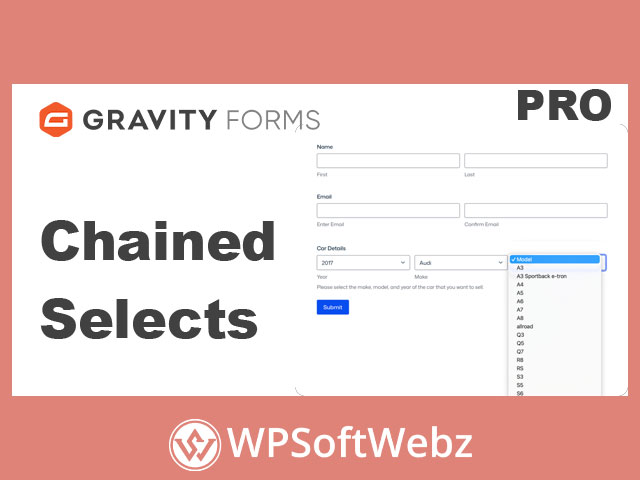

Gravity Forms Chained Selects is a premium Gravity Forms add-on that helps WordPress site owners create cascading dropdown fields where each selection dynamically controls the next available choices. Designed for complex form workflows, this advanced dropdown solution makes it easier to guide users through large option sets such as vehicle selectors, location hierarchies, product catalogs, service directories, and other dependent field structures.
Gravity Forms Chained Selects for Smarter WordPress Forms
Gravity Forms Chained Selects improves the way users interact with dropdown fields by showing only relevant choices based on previous selections. Instead of overwhelming visitors with long lists, the add-on narrows options step by step, helping users complete forms faster and with fewer mistakes.
This makes it especially useful for agencies, businesses, ecommerce websites, directories, educational organizations, nonprofits, and developers who need structured data collection inside WordPress forms.
Key Features of Gravity Forms Chained Selects
Cascading Dropdown Fields
The main purpose of Gravity Forms Chained Selects is to create dependent dropdowns. When a user selects an option in the first dropdown, the next dropdown updates automatically with related choices.
Common examples include:
- Year → Make → Model
- Country → State → City
- Category → Subcategory → Product
- Industry → Service Type → Provider
- Department → Team → Contact Person
This creates a guided form experience that feels more intuitive and organized.
CSV-Based Choice Uploads
Gravity Forms Chained Selects allows dropdown options to be imported through a CSV file. This is useful when managing large sets of related choices that would be difficult to enter manually.
CSV uploads are especially practical for:
- Automotive databases
- Location-based directories
- Product catalogs
- Service listings
- Internal business workflows
- Multi-level application forms
By managing options in a structured file, administrators can organize complex dropdown relationships more efficiently.
Support for Live Data Sources
For more advanced implementations, Gravity Forms Chained Selects can connect to live data sources using hooks and filters. This allows developers to pull dropdown options from external databases or APIs, helping keep form choices current without relying only on manual uploads.
This is valuable for websites where option data changes regularly, such as inventory systems, searchable directories, booking workflows, or dynamic product catalogs.
Reduced Form Friction
Large dropdown lists can slow users down and increase the chance of incorrect submissions. Gravity Forms Chained Selects reduces that friction by displaying only relevant options at each step.
This can help improve:
- Form completion speed
- User experience
- Data accuracy
- Conversion-focused form flows
- Administrative efficiency
- Customer or applicant onboarding
Better Data Quality
Because users are guided through predefined dependent options, submissions are more consistent and easier to process. This is especially helpful for businesses and organizations that rely on clean form data for reporting, routing, filtering, or follow-up communication.
Benefits of Using Gravity Forms Chained Selects
Gravity Forms Chained Selects is built for websites that need more than basic dropdown fields. It helps simplify complex decision paths and makes long forms easier to complete.
Key benefits include:
- Create dynamic dependent dropdowns in WordPress forms
- Guide users through complex selections step by step
- Import large option sets through CSV files
- Connect choices to external databases or APIs with developer customization
- Improve form usability by reducing irrelevant options
- Increase accuracy with structured, controlled selections
- Build cleaner workflows for agencies and client websites
- Support advanced use cases without overwhelming form visitors
Ideal Use Cases for Gravity Forms Chained Selects
Automotive and Vehicle Forms
Gravity Forms Chained Selects is well suited for vehicle selection workflows where users need to choose a year, make, and model. This helps dealerships, parts suppliers, insurance forms, and automotive service providers present relevant choices in a logical order.
Location-Based Forms
For forms that depend on geography, chained dropdowns can simplify location selection. A user can choose a country, then a region, then a city, making the form easier to navigate than a single long location list.
Ecommerce Product Filtering
Online stores and product-focused websites can use chained selects to help users narrow down product categories. A customer can choose a category, then a subcategory, then a specific product or option.
Service Directories
Business directories, consultant listings, agency networks, and service marketplaces can use Gravity Forms Chained Selects to help users find the right provider based on industry, service type, specialty, or location.
Application and Intake Forms
Organizations that collect structured information through application forms, quote forms, registration forms, or intake forms can use chained dropdown fields to keep user input clear and consistent.
Why Choose Gravity Forms Chained Selects?
Gravity Forms Chained Selects is a strong choice for WordPress users who already rely on Gravity Forms and need a premium add-on for advanced dropdown logic. Instead of using long static dropdown lists, this add-on creates a more focused form experience by adapting options based on user selections.
It is especially useful when form choices are connected, hierarchical, or dependent on previous answers. For developers and agencies, the ability to work with CSV files and live data sources adds flexibility for more advanced client projects.
Conclusion
Gravity Forms Chained Selects is ideal for WordPress websites that need dynamic dropdown fields, cleaner form workflows, and better data collection. Whether you are building vehicle selectors, product filters, service directories, location forms, or complex intake forms, Gravity Forms Chained Selects helps users make accurate selections with less effort. Use this premium Gravity Forms add-on to create smarter, more user-friendly forms that guide visitors from start to submission.