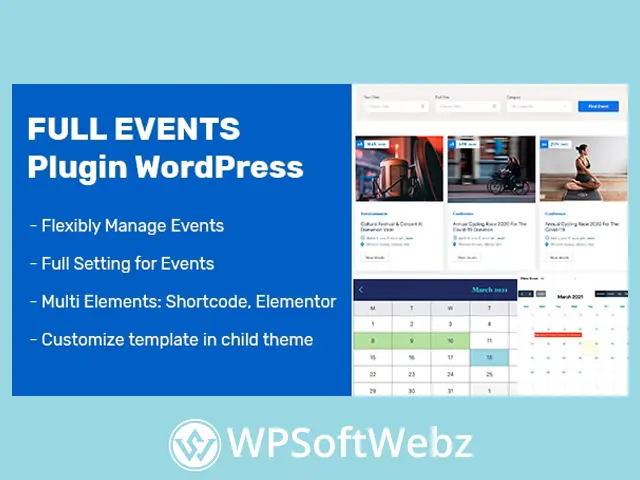

FullEvents Event Plugin WordPress is a premium event management solution for creating, organizing, and displaying events on a WordPress website. It combines attractive event listings, detailed event pages, calendar views, AJAX-powered discovery tools, Elementor template support, and WooCommerce-based booking functionality in one practical plugin. Designed for event organizers and website owners, it helps visitors find relevant events while giving administrators straightforward tools for managing event content without extensive coding.
FullEvents Event Plugin WordPress for Event Management
FullEvents provides the essential features needed to transform a standard WordPress installation into an organized event directory or promotional event website. Administrators can create and maintain event entries from the WordPress dashboard, while visitors receive a structured interface for browsing dates, categories, locations, and event details.
The premium WordPress event plugin can support websites promoting:
- Conferences and seminars
- Workshops and training sessions
- Music and entertainment events
- Sports activities
- Club and community gatherings
- Business networking events
- Educational programs
- Local and regional events
- Online or venue-based sessions
Its combination of event listings, search forms, calendars, and booking options makes FullEvents suitable for both individual organizers and organizations managing multiple activities.
Create Detailed Single Event Pages
Each event can be presented through a dedicated detail page containing the information visitors need before attending or making a booking.
Supported event information includes:
- Event title
- Organizer details
- Start and end dates
- Event time
- Venue information
- Location details
- Event description
- Ticket information
- Map content
- Image galleries
- Contact details
A well-organized single event page can improve the visitor experience by keeping schedules, venue information, descriptions, and registration details together in one accessible location.
Build Event Templates with Elementor
FullEvents supports Elementor for creating customized event detail templates. Website designers can arrange available event elements visually and build layouts that better match the branding of the active WordPress theme.
Elementor integration is useful for agencies and site owners who want greater control over:
- Event headers
- Date and time sections
- Organizer information
- Venue details
- Descriptions and media
- Booking areas
- Sidebars
- Full-width event layouts
This visual template-building approach reduces dependence on manually editing theme files and allows event pages to maintain a consistent design across the website.
Flexible Event Listing Layouts
The plugin offers multiple ways to display event archives and directories. Events can be presented in a visual box layout or an ordered line layout, depending on the type of website and browsing experience required.
Box Event Layout
The box layout emphasizes event imagery and provides a visually engaging presentation. It is well suited to entertainment websites, festivals, community portals, and other projects where promotional images play an important role.
Line Event Layout
The line layout presents events in a more structured chronological format. It can be useful for conference schedules, educational programs, business events, and websites where dates and ordering are the primary focus.
Event listing pages can also be configured with or without a sidebar, giving administrators additional control over page structure.
Advanced Event Search Form
FullEvents includes an advanced search form that helps visitors narrow event results using relevant criteria.
Users can search and filter events according to:
- Start date
- End date
- Event category
- Selected calendar dates
Date selectors make it easier to define a preferred period without manually entering dates. This is particularly valuable for websites containing many events, where visitors need a faster way to locate suitable activities.
AJAX Event Search and Filtering
AJAX functionality allows visitors to search or filter events without requiring a complete page reload. Results can be refreshed directly within the event page, creating a smoother and more responsive browsing experience.
AJAX-powered event discovery is especially useful for:
- Large event directories
- Conference schedules
- Community calendars
- Entertainment portals
- Training and workshop websites
- Multi-category event platforms
By reducing unnecessary page reloads, FullEvents helps users move between search criteria and results more efficiently.
Single and Full Event Calendar Views
The premium event calendar plugin provides both single calendar and full calendar presentation options.
Single Calendar
The single calendar highlights days containing scheduled events. Visitors can select a date to view the events associated with that day.
This format offers a compact way to browse event availability while keeping the initial calendar interface uncluttered.
Full Calendar
The full calendar displays scheduled events directly within the calendar interface. Visitors can review dates and corresponding events from a broader calendar overview without opening every individual day first.
These calendar options allow website owners to choose the presentation that best fits their audience, content volume, and page design.
Manage Events from the WordPress Dashboard
FullEvents includes an administrator-friendly interface for controlling event content. Site managers can create, edit, delete, or cancel events directly from the WordPress backend.
This centralized workflow helps organizers maintain accurate schedules and update event information when circumstances change. It can also simplify content administration for teams that do not want to rely on custom development for routine event updates.
Organize Events with Unlimited Categories
Administrators can create event categories and assign each event to the most appropriate group. Categories may represent topics, event types, industries, departments, venues, or audience interests.
Examples include:
- Music
- Sports
- Business
- Technology
- Education
- Workshops
- Community
- Entertainment
Category-based organization helps visitors discover related events and makes larger event directories easier to navigate.
WooCommerce Event Booking Support
FullEvents supports event booking through WooCommerce. This integration allows event reservations to use the established WooCommerce cart and checkout system.
Using WooCommerce for event booking can provide access to compatible checkout features and payment gateways already configured on the website. It also helps administrators manage event-related transactions within a familiar ecommerce environment.
This functionality can be used for:
- Paid conference registration
- Workshop reservations
- Seminar tickets
- Entertainment event bookings
- Training session enrollment
- Community event registration
The exact checkout options available depend on the WooCommerce setup and any additional extensions installed on the website.
Responsive Event Presentation
The plugin is designed to present event content across desktop, tablet, and mobile devices. Responsive layouts are important for event websites because visitors frequently review schedules, venue information, and booking details from smartphones.
A mobile-friendly event experience can make it easier for users to:
- Browse upcoming events
- Search by date
- Check venue details
- Review event descriptions
- Access booking options
- View calendars while traveling
RTL and Multilingual Website Support
FullEvents includes right-to-left language support and is listed as compatible with WPML. These capabilities can help website owners create event platforms for multilingual audiences or languages that use right-to-left text direction.
The final translation workflow and available language features may depend on the translation plugin, theme, and website configuration.
Benefits of FullEvents Premium
Using a dedicated WordPress event management plugin can reduce the need to assemble calendars, search tools, event templates, and booking functionality from several unrelated solutions.
Key benefits include:
- Centralized event administration
- Detailed event information pages
- Visual Elementor template creation
- Multiple event listing styles
- Date and category search tools
- AJAX-powered filtering
- Single and full calendar displays
- WooCommerce booking integration
- Category-based event organization
- Responsive presentation
- RTL and multilingual support
- Compatibility with different WordPress themes
Who Should Use FullEvents?
FullEvents is suitable for event organizers, businesses, educational institutions, community groups, agencies, and venue operators that need to publish and manage structured event information.
It can be particularly useful for:
- Conference organizers
- Seminar and workshop providers
- Music and entertainment promoters
- Sports clubs
- Schools and training providers
- Community organizations
- Business associations
- Event venues
- WordPress agencies building event websites
Create a More Organized Event Website
FullEvents Event Plugin WordPress brings event listings, calendars, AJAX search, Elementor templates, categories, detailed event pages, and WooCommerce booking tools into a unified premium solution. It is a practical choice for WordPress users who want to promote events professionally, simplify schedule management, and help visitors discover relevant activities.
Choose FullEvents to build a clearer, more engaging event platform and give your audience an easier way to browse, evaluate, and book upcoming events.