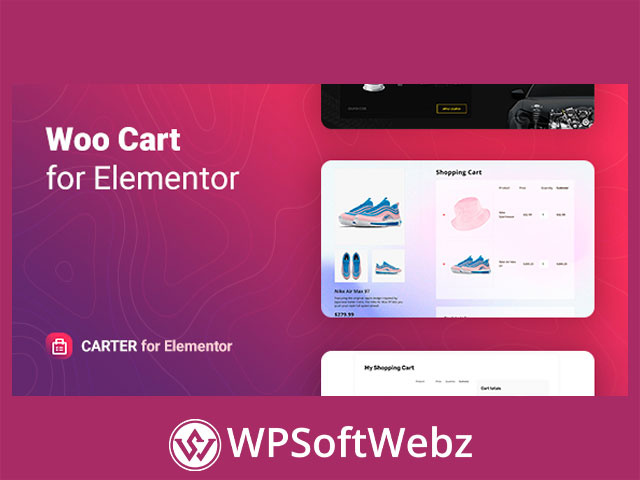

Carter – Advanced WooCommerce Cart for Elementor
Carter – Advanced WooCommerce Cart for Elementor is a premium WooCommerce cart plugin built for Elementor users who want more control over how the cart experience looks and works on their store. Based on the official product details, this plugin adds a customizable shopping cart widget for Elementor, making it easier to place and style a cart section anywhere on your website while improving clarity, usability, and overall shopping flow.
Why Carter – Advanced WooCommerce Cart for Elementor Stands Out
Unlike a basic default cart setup, Carter is designed for store owners, freelancers, and agencies that want a more tailored WooCommerce cart layout inside Elementor. It focuses on flexible display options, visual styling controls, responsive behavior, and a smoother shopping cart presentation for modern online stores.
Key highlights of Carter include:
- Custom WooCommerce cart widget for Elementor
- One-column and two-column cart layouts
- Flexible control over visible cart elements
- Custom empty cart view using Elementor templates or text
- Editable button text and icon options
- Hover animation support for cart buttons
- Fixed total amount column option
- Responsive settings for different screen sizes
- Built-in style controls for colors, typography, shadows, and backgrounds
- Included starter templates for faster setup
- Translation-ready and RTL-friendly structure
- Broad browser compatibility
Carter WooCommerce Cart Plugin Features
Custom Cart Layouts for Elementor Stores
A major advantage of Carter – Advanced WooCommerce Cart for Elementor is its Elementor-first approach. The plugin is built specifically for stores that use Elementor to design pages and want the shopping cart to match the rest of the site visually.
With Carter, you can choose between one-column and two-column cart layouts, giving you flexibility to build a compact cart section or a more spacious, conversion-focused cart page. This makes the plugin useful for:
- Custom cart pages
- Branded WooCommerce store layouts
- Landing pages with integrated cart sections
- Streamlined checkout preparation pages
- Elementor-based shop redesigns
Better Control Over Cart Visibility and Structure
Carter allows you to manage the display of separate cart elements, which helps you shape the user experience around your store’s goals. Instead of being locked into a single standard layout, you can adjust the cart presentation to suit your branding and customer journey.
This type of flexibility is valuable for stores that want to:
- Simplify the cart view
- Highlight the checkout path
- Emphasize totals and key actions
- Create a cleaner, less cluttered shopping experience
- Match the cart design to a premium storefront
Custom Empty Cart Design
One of the more practical features of Carter is the ability to customize the empty cart view using either Elementor templates or regular text. That means even when a customer has not added products yet, the cart area can still look intentional and branded rather than unfinished.
This can be especially helpful for encouraging further browsing and maintaining a polished user experience throughout the store.
Design and Styling Flexibility
Styling Controls Without Coding
Carter – Advanced WooCommerce Cart for Elementor includes a range of straightforward style settings that can be managed directly inside Elementor. According to the official details, users can adjust visual elements such as:
- Colors
- Typography
- Shadows
- Backgrounds
- Button styles
- Normal and hover states
For store owners and designers, this is a strong benefit because it reduces the need for custom CSS while still allowing a tailored look for the WooCommerce cart section.
Button and Interaction Enhancements
Carter also supports editable button text, icon management, and hover animations for cart actions. These details may seem small, but they can make the cart interface feel more polished and aligned with your overall store design.
For premium WooCommerce websites, these enhancements help create a more refined shopping experience and a stronger visual connection between product pages, the cart, and checkout.
User Experience Benefits for WooCommerce Stores
Fixed Total Column for Better Cart Usability
Another useful feature is the option to keep the total amount column fixed in relation to the cart block. For stores with longer cart content, this can improve visibility of totals and help customers stay focused on the next step in the purchase process.
This makes Carter a good fit for stores that want a more user-friendly cart layout, especially when customers are reviewing multiple products before checkout.
Responsive and Store-Friendly Presentation
Carter includes responsive settings, which is important for WooCommerce stores serving customers on desktop, tablet, and mobile devices. A responsive cart layout helps ensure that cart content remains readable, accessible, and easy to interact with across screen sizes.
For online shops that rely on mobile traffic, this adds practical value and supports a more consistent shopping experience.
Setup, Compatibility, and Everyday Use
Quick Start for Elementor Users
The plugin package includes starter templates that can help users get moving faster when building a custom cart layout. This is useful for agencies and freelancers who want to save setup time, as well as store owners who prefer a faster launch process.
Because Carter is designed to work within Elementor’s interface, it fits naturally into workflows where visual editing and frontend customization matter most.
Translation and Theme Compatibility
Carter is also positioned as translation-ready, supports RTL text direction, and is built to work with WordPress themes created with Elementor. That makes it a practical option for a wider range of WooCommerce stores, including multilingual shops and international eCommerce projects.
Who Carter – Advanced WooCommerce Cart for Elementor Is For
Carter – Advanced WooCommerce Cart for Elementor is best suited for WooCommerce store owners, Elementor users, agencies, and freelancers who want to replace a basic cart experience with a more customizable and visually polished one. It is especially useful for businesses that care about branded cart pages, responsive design, flexible layouts, and a smoother customer experience before checkout.
If you need a premium Elementor WooCommerce cart plugin with strong styling controls and practical layout options, Carter is a smart choice. Choose Carter – Advanced WooCommerce Cart for Elementor to create a cleaner, more engaging cart experience that better supports your store design and customer journey.