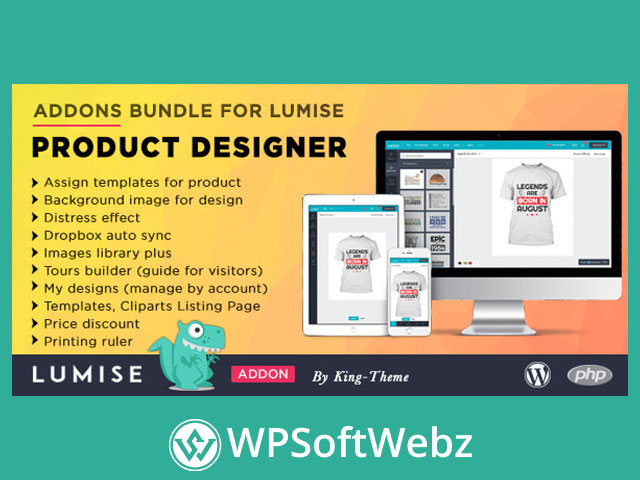

Addons Bundle for Lumise Product Designer is a premium add-on pack built to extend the Lumise Product Designer workflow for WooCommerce/WordPress stores that sell customizable products. Instead of relying only on the default designer experience, this bundle focuses on the practical tools shop owners often need most—template assignment, richer asset libraries, automated syncing, customer guidance, saved designs, and print/price helpers—so shoppers can start designing faster and you can manage personalization at scale.
Note! This package does not include the Lumise plugin.
Download Lumise Product Designer: https://wpsoftwebz.com/downloads/lumise-product-designer-for-woocommerce/
If you’re running a product customizer store (apparel, gifts, print items, signage, and more), this add-ons bundle is designed to reduce friction in the editor, streamline how design assets are presented, and support a smoother “choose → customize → purchase” journey.
Addons Bundle for Lumise Product Designer: What It Adds
This bundle includes a set of focused extensions that enhance both the admin workflow and the customer-side design experience. It’s especially useful when your catalog grows and you need more structure around templates, cliparts, pricing rules, and customer onboarding.
Key benefits at a glance
- Improve the customer experience with guided tours and easier starting points
- Speed up customization using templates, background guides, and asset libraries
- Help customers come back to saved work with account-based design management
- Support print-ready decision making with measurement tools
- Simplify asset maintenance via automated syncing
Included Add-ons and How They Help
Below is what the bundle provides, based on the item’s stated features.
Assign templates for product
Assign specific design templates to individual products so customers start with the right layout for the item they’re customizing. This is ideal for stores that sell multiple product types (e.g., shirts, mugs, labels) where each item needs its own design starter.
Why it matters:
- Faster “start designing” moment
- Consistent layouts per product category
- Less confusion for first-time users
Background image for design
Add background images inside the design experience to guide placement, sizing, or layout. This is useful for aligning artwork to a product area or providing a visual guide to reduce misplacement.
Common uses:
- Placement guides for logos and text
- Visual boundaries for safe/bleed areas (where applicable)
- Product-area alignment hints
Distress effect
Apply a distress-style effect for vintage, worn, or textured looks—popular for apparel design, retro branding, and stylistic typography treatments.
Great for:
- Retro t-shirt graphics
- “Worn print” aesthetics
- Adding character to simple artwork
Dropbox auto sync
Automate syncing of design resources from Dropbox, helping keep cliparts/images up to date without repetitive manual uploads. This can be a big time-saver if your catalog of assets changes frequently.
Operational advantages:
- Centralized asset management
- Easier updates across large libraries
- Reduced manual maintenance
Images library plus
Enhance the image library experience for managing and using image resources in the designer. When your store offers many graphics or resource options, improved library handling can make browsing and selecting assets quicker.
Tours builder (guide for visitors)
Create guided tours to onboard customers inside the product designer. This helps reduce abandonment by showing shoppers where to click, how to add elements, and how to finish their design.
Perfect for:
- First-time customers
- Complex products with multiple steps
- Reducing support tickets (“How do I…?”)
My designs (manage by account)
Enable account-based design management so customers can return to saved designs, continue later, or reuse designs for repeat purchases. This is especially valuable for teams, organizations, and returning buyers.
Business impact:
- Encourages repeat orders
- Supports longer decision cycles
- Improves customer retention for custom products
Display templates, cliparts (frontend browsing page)
Provide a dedicated page that displays templates and cliparts so end users can browse options and choose a starting point before entering the editor. This turns your design resources into a more storefront-like experience.
Why shoppers like it:
- Browse-first workflow (like a catalog)
- Easier discovery of templates/cliparts
- Faster path to a good-looking result
Price discount
Add discount functionality to support promotional pricing logic for customized products. This helps you run marketing campaigns while still selling personalized items.
Printing ruler
Add a ruler/measurement tool to support print sizing awareness and layout precision. Measurement guidance can reduce mistakes and improve customer confidence—especially for designs where exact placement matters.
Practical use cases for WooCommerce personalization stores
This bundle is a strong fit when you sell:
- Custom t-shirts, hoodies, and apparel
- Personalized gifts (mugs, bottles, phone cases)
- Stickers, labels, packaging, and print items
- Team/club merch where buyers reuse designs
- Products where placement precision is important
Who this bundle is for
Addons Bundle for Lumise Product Designer is best for store owners who want a more guided, template-driven, resource-rich customization experience—without rebuilding their workflow from scratch. If you rely on templates, cliparts, reusable customer designs, or you want a cleaner onboarding path in your product designer, this add-on pack is a practical upgrade.
Conclusion
If your goal is to make product personalization easier to start, easier to manage, and more conversion-friendly, Addons Bundle for Lumise Product Designer brings together the key enhancements that many Lumise-powered WooCommerce stores need. Add it to your toolkit to streamline customization, support better browsing and reuse, and help customers complete designs with confidence.