
WP Switchboard Pro
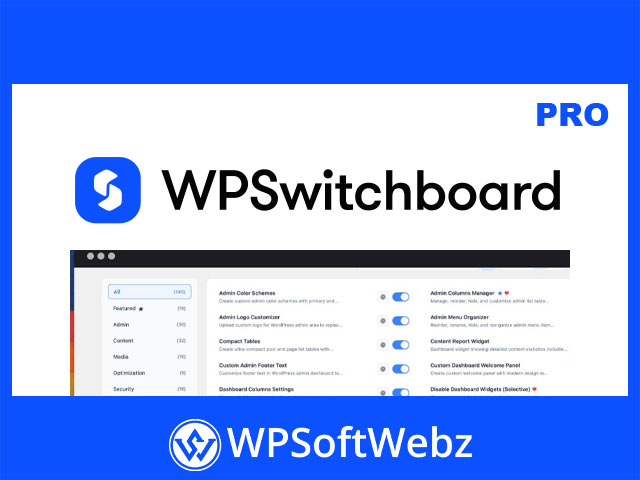
WP Switchboard Pro is a premium modular WordPress plugin designed to help site owners, developers, and agencies manage many common WordPress admin, optimization, security, media, content, and utility tasks from one centralized interface. Official documentation refers to the product as Switchboard Pro, while the main website uses WPSwitchboard branding, and the plugin focuses on enabling only the tools you need instead of relying on many separate single-purpose plugins.
WP Switchboard Pro for Modular WordPress Site Management
WP Switchboard Pro is built around a modular approach. Instead of loading every feature all the time, users can activate specific modules based on the needs of each website. This helps create a cleaner WordPress admin experience and can reduce unnecessary functionality on sites that only need selected tools.
For agencies and developers managing multiple client websites, this type of modular WordPress plugin can be especially useful because it brings many everyday site management features into one workflow.
Key Features of WP Switchboard Pro
WP Switchboard Pro includes a broad collection of confirmed feature categories and admin-focused capabilities:
- Modular WordPress feature system
- Enable or disable tools individually
- Centralized WordPress admin interface
- Fast module and setting search
- Command launcher using keyboard shortcut access
- Module-specific settings panels
- Configuration import and export
- Preset management for different project setups
- Admin dashboard customization tools
- WordPress admin menu organization
- Login page and admin branding tools
- Content management utilities
- Media and image handling tools
- Optimization and cleanup modules
- WordPress security hardening tools
- User role and profile management tools
- Redirect, analytics, forms, and maintenance utilities
- Developer-friendly workflow tools
Admin Customization and Workflow Control
WP Switchboard Pro provides tools for improving the WordPress admin experience. Confirmed admin-focused modules include options for admin menu organization, admin branding, dashboard cleanup, admin notices control, custom admin CSS, custom dashboard welcome content, admin columns management, featured image columns, and login page customization.
These tools are useful for developers, freelancers, and agencies that want to deliver a cleaner client dashboard or create a more efficient internal workflow for managing WordPress sites.
Content Management Tools
The plugin includes content-focused modules that support publishing, site structure, and editorial workflows. Examples include breadcrumbs, table of contents, reading time, related posts, social sharing, post duplication, public preview for drafts, content expiration, custom post type builder, custom taxonomy builder, custom field groups, custom post order, external permalinks, and post view tracking.
These features make WP Switchboard Pro useful for blogs, business websites, content-heavy portals, marketing sites, and client projects where content organization matters.
Media and Image Features
WP Switchboard Pro includes media modules for improving how images and files are handled inside WordPress. Confirmed media-related tools include image upload renaming, media categories, media replacement, thumbnail regeneration, SVG support, WebP conversion, custom image sizes, default featured images, unused media detection, and media library workflow improvements.
For websites with large media libraries, these features can help improve organization, reduce manual work, and support better image management.
Optimization and Performance Modules
WP Switchboard Pro includes optimization tools aimed at cleaning up WordPress and reducing unnecessary load. Confirmed optimization modules include database cleanup, revisions control, transients cleaning, heartbeat control, disabling emojis, disabling embeds, disabling feeds, disabling Dashicons on the frontend, and related performance-focused controls.
These tools are useful for website owners who want to streamline WordPress behavior without installing several separate optimization plugins.
Security and Login Protection
The plugin also includes security-focused modules that help harden WordPress sites. Confirmed security features include activity logging, limit login attempts, security headers, disabling XML-RPC, disabling file editing, hiding the WordPress version, forcing SSL in the admin area, restricting REST API access, IP whitelist or blacklist controls, password protection, author archive protection, username blacklist controls, CAPTCHA protection options, two-factor authentication, and custom login URL functionality.
For agencies, membership sites, business websites, and client projects, these modules can help add practical security layers directly from the WordPress admin.
User Management Features
WP Switchboard Pro includes user management modules for controlling access, roles, profiles, and login workflows. Confirmed tools include role editing, temporary login links, login as user, multiple user roles, redirect after login, username changing, local avatars, user export, simplified profiles, last login columns, registration date columns, and viewing the admin area as another role.
These features are especially valuable for membership websites, client support, WooCommerce stores, editorial teams, and development workflows where user access needs to be tested or managed carefully.
Utility Modules for Everyday WordPress Tasks
The plugin includes utility modules for common WordPress site management needs. Confirmed utilities include redirects management, robots.txt management, ads.txt management, header and footer code insertion, tracking code management, coming soon mode, maintenance mode, SMTP email configuration, WP mail logging, simple forms, system summaries, performance monitoring, broken link checking, 404 tracking, custom fonts, code snippets, and privacy-focused analytics.
These tools make WP Switchboard Pro a practical all-in-one WordPress admin toolkit for technical and non-technical site owners.
Configuration Import, Export, and Presets
WP Switchboard Pro supports configuration import and export, helping users apply preferred module setups across multiple websites. The official documentation also describes preset management, which allows different configurations to be saved and reused for different project contexts.
This is useful for agencies and developers who manage repeated WordPress setups and want consistent admin, security, performance, and utility settings across projects.
Ideal Use Cases for WP Switchboard Pro
WP Switchboard Pro is suitable for:
- WordPress developers and agencies
- Freelancers managing client websites
- Business websites needing admin cleanup
- Content-heavy WordPress sites
- WooCommerce and membership projects
- Site owners wanting fewer separate utility plugins
- Developers who need reusable configuration presets
- WordPress administrators who want a cleaner dashboard
- Agencies that want consistent site management workflows
- Website owners looking for modular security and optimization tools
SEO and Practical Value
WP Switchboard Pro is relevant for searches around modular WordPress plugin, WordPress admin toolkit, WordPress optimization plugin, WordPress security tools, admin customization plugin, and WordPress productivity plugin. Its main value is the combination of multiple site management tools in one modular interface, allowing users to activate only the features needed for each website.
Conclusion
WP Switchboard Pro is a powerful premium WordPress plugin for users who want a centralized, modular way to manage admin customization, content tools, media workflows, optimization, security, user management, and utilities. For developers, agencies, freelancers, and serious WordPress site owners, WP Switchboard Pro offers a practical way to simplify site management, reduce plugin overload, and build more efficient WordPress workflows.