
Sigma Media Manager for Smarter WordPress Media Organization
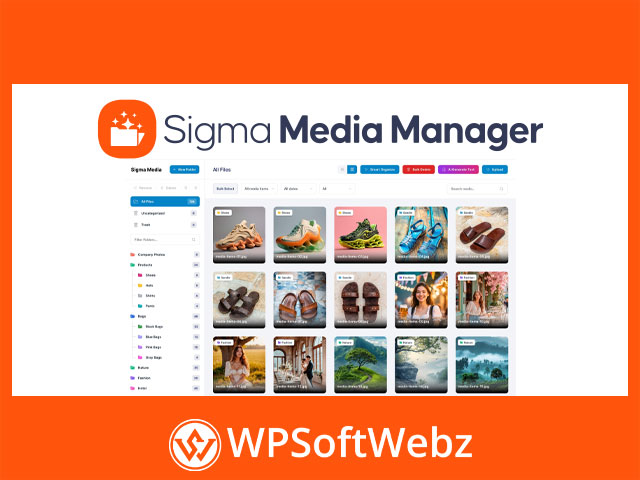
Sigma Media Manager is a premium WordPress media library plugin built to help website owners organize files more efficiently with folders, drag-and-drop controls, filters, and workflow-friendly media tools. Based on the official product information from BdThemes, it enhances the default WordPress media experience by adding a cleaner structure, faster browsing, and better control over growing media libraries without changing the familiar native media environment.
For site owners, agencies, publishers, and WooCommerce stores dealing with a large number of images, documents, and downloadable assets, Sigma Media Manager is positioned as a practical solution for keeping the media library tidy, searchable, and easier to manage day to day.
Why Choose Sigma Media Manager?
The default WordPress media library can become difficult to manage as your content grows. Sigma Media Manager addresses that problem with a visual folder-based system and a set of advanced controls designed to simplify organization and reduce clutter.
Key benefits include:
- Folder-based media organization
- Drag-and-drop file and folder management
- Smart filtering and search options
- AI-generated titles, captions, and descriptions for images
- Bulk cleanup for unused media files
- Grid and list display modes
- Document library creation for front-end file sharing
- Import, export, and reset tools for settings management
Core Features of Sigma Media Manager
Folder Management and Visual Organization
One of the standout strengths of Sigma Media Manager is its folder management system. You can create, rename, and organize folders to keep your WordPress uploads structured in a way that matches your workflow.
Highlighted folder tools include:
- Easy folder creation and organization
- Folder colors for faster visual identification
- Auto-expand support for subfolders
- Keyboard shortcuts for quicker navigation
- Drag-and-drop movement of files and folders
- Item count visibility and sorting controls
This makes the plugin especially useful for content-heavy websites, client projects, membership sites, and stores with extensive product media.
AI Text Generation for Media Files
Sigma Media Manager also includes AI-assisted text generation for media metadata. According to the official documentation and product page, it can generate titles, captions, and descriptions for images, helping users improve consistency and reduce repetitive manual work.
This feature is particularly useful when you want to:
- Speed up image organization
- Improve caption and title consistency
- Fill empty media fields more efficiently
- Support a more polished content workflow
For teams handling many uploads, this can save time while keeping the media library better documented.
Bulk Delete Unused Media
A cluttered media library often contains files that are no longer used anywhere on the website. Sigma Media Manager includes a bulk unused media cleanup workflow that scans the library, identifies files not used in posts or pages, and lets you review them before removal.
This can help with:
- Reducing unnecessary storage usage
- Cleaning up outdated or orphaned uploads
- Improving media library manageability
- Keeping the backend more streamlined
The preview-before-delete approach adds an extra layer of control, which is important when cleaning up a busy WordPress site.
Smart Filters, Search, and Display Controls
Finding the right asset quickly is critical when working in WordPress. Sigma Media Manager includes smart filters and search tools so users can sort and locate media by folder, type, or date more efficiently.
It also provides display and viewing options such as:
- Grid and list view modes
- Adjustable items per page
- Custom thumbnail sizing
- Resizable sidebar
- Show or hide file information
These usability improvements make the media experience feel more flexible and productive, especially for large libraries.
Native WordPress Integration
A major advantage of Sigma Media Manager is that it works directly inside the default WordPress Media area rather than forcing users into a completely separate admin experience. The official documentation states that files are organized visually and are not physically moved on the server.
That matters because it supports a smoother workflow and helps preserve compatibility with the standard WordPress media system, themes, and plugins.
What this means for users:
- A familiar admin environment
- Easier adoption for WordPress users
- Cleaner media workflows without unnecessary complexity
- Better organization without disrupting file structure on the server
Document Library Capabilities
Beyond backend media organization, Sigma Media Manager also includes a Document Library section. This allows users to create a library of downloadable files and present it to visitors on the front end.
Verified document library options include:
- Grid or list layout selection
- Search and filter visibility controls
- File size, date, and type display options
- Favourite and download count options
- Sorting controls
- Shortcode-based display
- Password protection for files or libraries
This makes the plugin relevant not only as a media organizer, but also as a practical document library plugin for WordPress sites that need to share PDFs, downloads, guides, or private files.
Backup, Import, and Reset Tools
Settings management is another helpful part of the plugin. BdThemes documentation confirms export and import tools for settings, along with reset functionality.
These tools can be useful for:
- Backing up plugin settings
- Reusing configurations across sites
- Restoring saved setups
- Resetting options when troubleshooting or restarting your setup
For developers, freelancers, and agencies, this adds convenience when managing multiple WordPress projects.
Who Should Use Sigma Media Manager?
Sigma Media Manager is well suited for:
- Bloggers and publishers with growing media libraries
- WooCommerce stores managing large product image collections
- Agencies handling multiple client assets
- Course creators and membership sites sharing downloadable resources
- Businesses that want a cleaner, more organized WordPress backend
- Teams looking for faster media handling and less manual file cleanup
Final Thoughts on Sigma Media Manager
If your WordPress media library feels messy, slow to navigate, or difficult to control, Sigma Media Manager offers a more structured and feature-rich way to manage files. Its mix of folder organization, drag-and-drop handling, AI text generation, unused media cleanup, document library support, and display controls makes it a strong option for users who need more than the default WordPress media experience.
For anyone looking to streamline file organization and improve media workflow inside WordPress, Sigma Media Manager is a compelling choice worth considering. Explore whether Sigma Media Manager fits your site setup and take a more organized approach to managing your media library.