
Mapplic – Custom Interactive Map WordPress Plugin
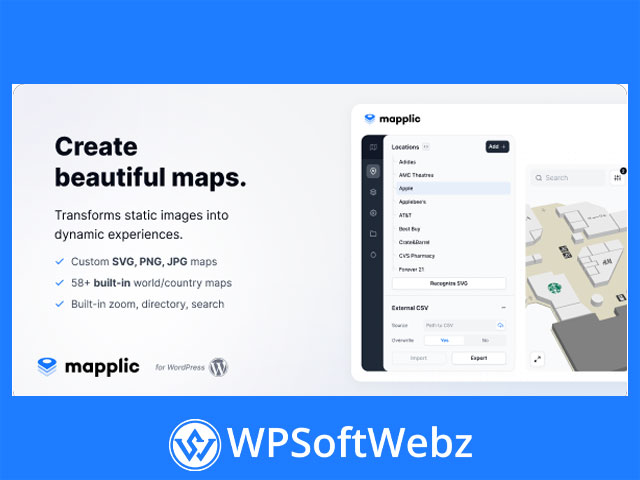
Mapplic – Custom Interactive Map WordPress Plugin is a premium WordPress mapping solution designed to turn static SVG, PNG, and JPG files into dynamic, interactive maps. It is built for businesses, venues, directories, property projects, campuses, museums, tourism sites, and any website that needs a polished custom map experience without relying on generic map layouts.
Rather than limiting you to standard map embeds, Mapplic gives you the flexibility to build branded image maps, vector maps, and floor plans that match your exact project. This makes it a strong choice for site owners who want interactive navigation, clickable locations, and a more engaging way to present spatial information in WordPress.
Why Choose Mapplic for WordPress Interactive Maps
Mapplic stands out as a custom interactive map plugin because it supports both image-based and vector-based maps. That means you can work with floor plans, illustrated maps, venue layouts, regional maps, campus maps, store directories, and other visual map formats that are specific to your business.
Core strengths of Mapplic
- Supports SVG, PNG, and JPG map files
- Works with custom maps and built-in geographic maps
- Lets you create multi-layer and multi-floor maps
- Enables interactive locations with rich content
- Includes an integrated directory with search and filtering
- Supports CSV and JSON location data
- Offers styling controls for markers, SVG elements, and interface colors
- Can be used through an online platform or manual installation
Key Features of Mapplic – Custom Interactive Map WordPress Plugin
Flexible map building with layers
Mapplic uses layers as the foundation of each map. A single project can contain one or multiple layers, which is especially useful for multi-floor buildings, complex venues, or maps that need different levels or sections.
This is ideal for:
- Shopping centers
- Hospitals
- Office buildings
- Universities
- Museums
- Event venues
- Real estate developments
Because layers can use image or vector files, Mapplic adapts well to both visual floor plans and more technical mapping projects.
Unlimited locations with rich content
One of the biggest advantages of Mapplic is its support for an unlimited number of locations. Each location can include structured content and presentation options, helping you build a detailed interactive directory inside your map.
Location content can include:
- Title
- Short description
- Main description
- Thumbnail
- Image
- Link
- Phone details
- Opening hours
This makes Mapplic useful not only as a map plugin, but also as a location finder, property viewer, or interactive directory tool for WordPress.
Custom markers and visual styling
Mapplic gives you strong control over how locations appear. You can customize marker types, labels, scaling, colors, and styles, then refine the interface further with custom CSS.
Available styling options include:
- Marker colors
- Hover and active states
- Stroke colors and widths
- Text colors
- Brand-oriented primary color settings
- CSS-based appearance customization
For businesses that care about visual consistency, this helps create an interactive map that feels native to the website instead of looking like a third-party add-on.
Searchable Directory and Filters
Built-in directory for better usability
A major benefit of Mapplic – Custom Interactive Map WordPress Plugin is its integrated directory. The plugin includes a filterable location directory with configurable layouts, making it easier for visitors to browse and discover points of interest.
Directory features include:
- List or grid presentation
- Grouping by categories
- Ordering by title
- Thumbnails or image-based previews
- Sidebar toggle options
- Search and filtering tools
This combination of map view plus directory view is especially valuable for websites with many locations, such as venue guides, retail maps, tourist attractions, and office directories.
Groups and custom filtering
Mapplic also supports grouped locations and custom filters. That gives site owners a practical way to organize map points by category, type, or other project-specific logic.
Use cases include filtering by:
- Department
- Building section
- Availability
- Service type
- Property status
- Venue category
- Accessibility options
This makes the plugin well suited for large, data-rich map experiences.
Data Management and Content Flexibility
CSV and JSON support
Mapplic supports location data in both CSV and JSON formats, which is useful for teams managing larger sets of map data. Locations can be exported to CSV, imported from CSV, or combined across JSON and CSV workflows.
This is a valuable feature for:
- Directory-based websites
- Real estate listings
- Facility management
- Event planning
- Multi-location businesses
Instead of manually entering every point one by one, you can structure and maintain location data more efficiently.
Template variables and reusable samples
The plugin also supports reusable sample-based location setups and template variables. This can simplify the management of maps where many points share common structures, styling, or content logic.
That is especially helpful when creating:
- Lot maps
- Seating layouts
- Property availability maps
- Repeating point-of-interest entries
- Uniform directory layouts
Geographic Maps and Advanced Map Options
Built-in geographic maps and geocalibration
Mapplic allows you to start with built-in geographic maps or upload your own files. It also supports geocalibration for maps that use Web Mercator projection, enabling location placement through latitude and longitude coordinates.
This gives the plugin broader flexibility for projects that need a hybrid approach between fully custom visual maps and geographic map functionality.
Online platform and manual deployment
According to the official documentation, Mapplic can be used through an online platform or by manual installation. This gives users different deployment paths depending on their workflow, hosting preferences, and project requirements.
Practical benefits include:
- Faster setup for some projects
- self-hosted deployment options
- map embedding on websites
- flexibility for different technical environments
Best Use Cases for Mapplic
Who benefits most from Mapplic
Mapplic is particularly well suited for websites that need more than a basic map embed. It works best when you need a custom visual map tied to content, navigation, and user discovery.
Popular use cases include:
- Interactive floor plans
- Store and venue directories
- Real estate community maps
- Campus and facility maps
- Museum and exhibition guides
- Travel and tourism maps
- Office location maps
- Event site maps
Because it supports custom visuals, searchable directories, and rich location data, Mapplic fits projects where clarity, usability, and branding all matter.
Final Thoughts on Mapplic – Custom Interactive Map WordPress Plugin
Mapplic – Custom Interactive Map WordPress Plugin is a strong premium choice for WordPress users who want to turn static images and vector files into engaging interactive maps. With support for layered maps, unlimited locations, searchable directories, CSV and JSON data, custom styling, and flexible deployment options, it offers a practical and scalable solution for many types of mapping projects.
Mapplic is best for businesses, developers, agencies, venue managers, educators, property marketers, and organizations that need custom interactive maps with a professional presentation. If you want a premium WordPress map plugin that helps visitors explore locations more easily and interact with your content in a more visual way, Mapplic is a compelling option worth considering.