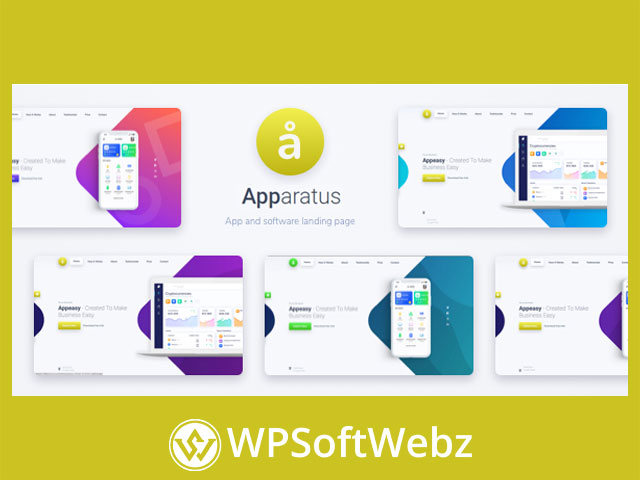

Apparatus is a premium one-page WordPress theme by Fluent-Themes built for high-impact landing pages, app/software showcases, and creative portfolio-style sites. It’s designed to help you launch quickly with importable demo layouts, then refine everything visually using a live page-building workflow and extensive theme options—ideal when you want a polished, conversion-friendly one-page experience without starting from scratch.
Apparatus One-Page WordPress Theme Overview
Apparatus focuses on fast setup and flexible customization for modern one-page websites. The theme’s workflow centers on three practical ideas: import a starter site, edit it visually, and fine-tune global styling and layout settings from a dedicated options panel.
Quick-start workflow (import → edit → launch)
With Apparatus, you can:
- Import a pre-built demo website using one-click demo import
- Customize layouts and sections with a visual, live editing experience
- Adjust global styling and site-wide settings through a robust Theme Options area
This approach is especially useful for landing pages, product announcements, agency one-pagers, personal portfolios, and SaaS/app marketing sites where structure and pacing matter.
Key Features of Apparatus for Landing Pages and One-Page Sites
Apparatus includes a set of features that align closely with what most one-page websites need: speed to launch, strong mobile presentation, and easy section-based navigation.
One-click demo import for rapid setup
Instead of building pages from a blank canvas, you can import complete demo content (including pages, menus, and configuration) and then replace it with your own copy, images, and branding. This is a practical advantage for freelancers and teams who want consistent results across projects.
Visual page building with WPBakery support
The official documentation outlines a workflow that uses WPBakery Page Builder, including guidance for working with the editor and using custom elements provided by the theme. This helps you build and rearrange sections—common in one-page layouts—without manual coding.
Smooth scrolling one-page navigation
Apparatus supports a classic one-page pattern: clicking a menu item smoothly scrolls visitors to a specific section. This makes it easier to create focused storytelling pages (hero → features → proof → pricing → CTA) and improves overall usability for single-page designs.
Theme Options for global control
Apparatus includes a dedicated Theme Options panel for managing key site elements like:
- Theme colors and styling controls
- Logo setup (including a text-logo approach)
- Header and footer configuration
- Favicon and other common brand settings
This is important for agencies and site builders who want consistent branding controls that don’t require editing each section manually.
Design, Responsiveness, and Store-Readiness
Modern landing pages must look great on phones, load cleanly, and support growth if you later expand beyond a single CTA.
Fully responsive layout
Apparatus is built to display well across devices, helping your landing page, portfolio, or product site remain readable and visually consistent on mobile, tablet, and desktop.
WooCommerce-ready foundation
If your “landing page” eventually needs to sell something—digital products, services, or merchandise—Apparatus is positioned as WooCommerce-ready, making it easier to evolve from a simple one-page brochure site into a lightweight storefront experience.
Unlimited color styling potential
For brand-led projects (startups, personal brands, studios), color flexibility matters. Apparatus highlights broad color variation capabilities so you can align sections, buttons, accents, and UI styling with your brand identity.
Translation-Ready for Multilingual Sites
If you’re building for an international audience, Apparatus is described as translation-ready. The documentation also references a translation workflow using standard tooling (such as Poedit), which can help you localize theme text and labels for multilingual sites.
Typical Use Cases for Apparatus
Because it’s centered on a one-page structure and fast customization, Apparatus is a strong fit for:
- App & SaaS landing pages: Present features, screenshots, benefits, and CTAs in a clean scroll flow
- Agency or studio one-pagers: Highlight services, portfolio work, and testimonials in a single narrative page
- Freelancer portfolios: Showcase projects and contact details without heavy navigation
- Product or campaign landing pages: Build a focused conversion page with section-based storytelling
- Business “quick presence” sites: Launch a professional one-page website while keeping room to expand later
Getting Started with Apparatus
The developer documentation outlines a straightforward setup path:
- Install the Apparatus WordPress theme in your WordPress dashboard
- Install and activate the bundled/required plugins prompted by the theme
- Run demo content import to replicate a starter demo layout
- Edit pages using the supported page builder workflow and the theme’s custom elements
- Configure site-wide branding and layout from Theme Options (logo, colors, header/footer)
This setup pattern is ideal if you want your site to closely match the live preview style, then tailor it to your brand.
Conclusion: Who Apparatus Is For (and Why It Works)
If you want a premium, polished one-page WordPress theme that supports fast demo-based setup, visual editing with WPBakery, smooth-scrolling navigation, and practical site-wide controls, Apparatus is designed to meet those needs. It’s best for creators, freelancers, agencies, and startups who want a modern landing page or portfolio-style one-pager that can be customized quickly and presented professionally.
Bring your brand assets and copy, import a starter layout, and start shaping a focused, high-converting site experience—Apparatus is built to help you launch with confidence.